Important: These forums are for discussions between SkyDemon users. They are not routinely monitored by SkyDemon staff so any urgent issues should be sent directly to our Customer Support.

How to set SD to follow a router segment creation-order during a live navigation


How to set SD to follow a router segment creation-order during a live...
Author
Message
Adam N
A
Too Much Forum (1.4K reputation)Too Much Forum (1.4K reputation)Too Much Forum (1.4K reputation)Too Much Forum (1.4K reputation)Too Much Forum (1.4K reputation)Too Much Forum (1.4K reputation)Too Much Forum (1.4K reputation)Too Much Forum (1.4K reputation)Too Much Forum (1.4K reputation)
Group: Forum Members
Posts: 14, Visits: 6
In a a live navigation (en route) navigation regime,
what is the configuration option to make SD stick to the preconfigured route segments in the true order of these,
and not to "randomly" skip to the segment which is closest to the actual position.

Have a look at the example route I'm flying (quite often, in fact):
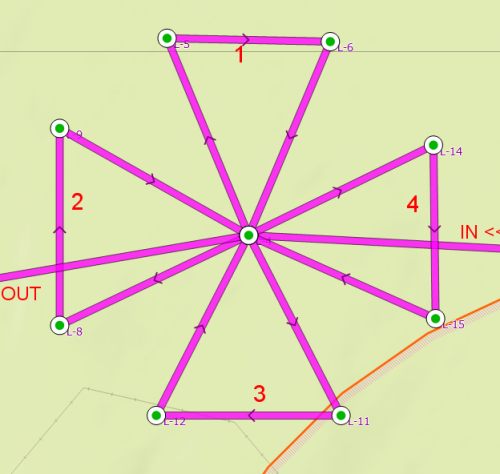


Each router segment length is about 1 nautical mile, so there is enough separation
to see that each particular segment has indeed been flown (waypoint to waypoint, of course never exactly on spot).

When flying not exactly on course, or even just being close to the middle point,
the SD jumps to the closest route segment, but not to next logical route segment.
I have placed the segments in a right order, and it is even properly shown in the Pilot Log (and other places),
yet during the flight, the SD selects the segment it sees the most close.

So my question is - what is (and where is) the specific configuration option,
to force the route segment selection in a proper order.


I'm using SD on Android and on PC (3.8.2.0).
Reply
Adam N
A
Too Much Forum (1.4K reputation)Too Much Forum (1.4K reputation)Too Much Forum (1.4K reputation)Too Much Forum (1.4K reputation)Too Much Forum (1.4K reputation)Too Much Forum (1.4K reputation)Too Much Forum (1.4K reputation)Too Much Forum (1.4K reputation)Too Much Forum (1.4K reputation)
Group: Forum Members
Posts: 14, Visits: 6
Thanks Tim,
‌I suppose for a general navigation, one won't have any segment of a route so close to each other, so the default algorithm might (and does) work well.

I'm asking for something that is not usual to do, I know. My question is on how to do that with the actuall configuration possibilities of SD.‌‌

Maybe if there is an option to force a lock on the zoom, then I would simply fly the little airplane . . . yet still have to know which segment comes next, and not mix it up.

Also, is it possible to place a remark (short note) on a leg, and have it (the note text) constantly drawn on the segment‌‌ during flight ? the same way as the course and segment length is shown (when you click on the segment), but this note would be visible all the time on all the segments... Then I would just place a upcounting set of numbers, one on each leg segment, and fly manually aligning to the actual number.

Just thinking out loud - and hoping to receive any hint that would help me out, even a little bit. Thanks in advance.‌‌

GO

Merge Selected

Merge into selected topic...


Merge into merge target...


Merge into a specific topic ID...


Reading This Topic

Login

Explore
Messages
Mentions
Search